Computer Repairs & IT
Google Cloud Trial Error OR_BACR2_59: Try This Shields Fix
Seeing “Billing setup can’t be completed” while signing up for Google Cloud in Brave? A site-specific Shields change resolved this error in our signup.
The quick fix for Brave users
If Google Cloud trial signup stops with error OR_BACR2_59 while you are using Brave, try turning Brave Shields off for the Google signup site, then reload the page and retry.
This resolved the signup problem reported by Astra IT’s owner. It is a useful first check before assuming your payment card is the problem. The same error can have other causes, so the steps below also explain what to do if it remains.
The problem: “Billing setup can’t be completed”
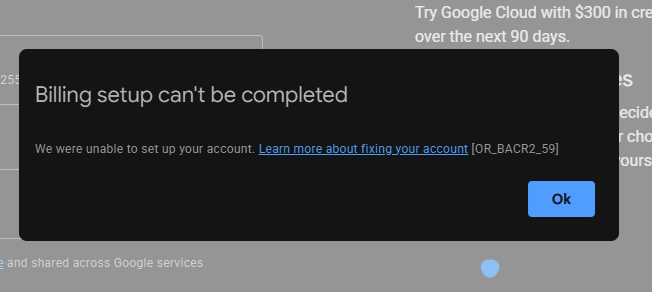
You reach the Google Cloud billing setup stage, submit your details and receive an error instead of completing registration. The screenshot supplied with this guide shows the following wording:
Billing setup can't be completed
We were unable to set up your account. Learn more about fixing your account [OR_BACR2_59]
The code is OR_BACR2_59, including the underscores. The message itself does not identify which part of signup failed. In the case described here, changing Brave’s site protection setting allowed signup to complete.
How to turn Brave Shields off for the signup site
1. Open the Google Cloud signup page where the error appeared. Check that you are on the genuine Google page before entering billing details.
2. Click Brave’s lion-shaped Shields icon beside the address bar.
3. Check the site name in the Shields panel, then switch the main Shields toggle off for that site.
4. Let the page reload, or refresh it yourself if needed. Review the form and retry the signup step.
5. After signup is complete, switch Shields back on for the site and check that the console still works.
Use the address-bar panel for this change. You do not need to switch off Shields globally. Brave remembers site exceptions, so closing the tab alone does not restore the setting.
Brave’s official guide to site-specific Shields settings shows where to find these controls.
Why this can help
Brave explains that Shields can sometimes interfere with a website. Google’s signup troubleshooting guidance also recommends checking browser settings and temporarily disabling extensions such as ad blockers that may disrupt onboarding.
That makes browser blocking a reasonable explanation for the successful workaround here. We have not identified the exact blocked request, and the error code alone does not prove that Shields caused the failure.
Shields is built into Brave. Opening a private window is not the same as explicitly checking the Shields setting for the page.
If OR_BACR2_59 still appears
Restore Shields if the change did not help. Try the signup in another up-to-date browser, such as Chrome, to check whether the problem is specific to your Brave setup.
Then work through Google’s official signup checklist: confirm that your billing details match your bank’s records, check that your payment method is supported, and review any outstanding Google account balances. Google also recommends checking whether a VPN or proxy is affecting signup.
If those checks do not resolve it, use the support route linked from Google’s troubleshooting page. Include the exact error code and a screenshot with personal and payment information removed.
This browser workaround does not change trial eligibility or Google’s billing verification requirements. Those decisions remain with Google.
Keep the fix specific to the problem
For the Brave signup issue described here, the useful change was simple: Shields off for the signup site, reload, and retry. Keep your normal protections enabled elsewhere and restore the site setting after testing.
Need help working through a stubborn browser issue? Contact Astra IT to discuss it. Please do not send passwords or payment-card details.
Sources
Need a hand with your technology?
Talk to Astra IT about repairs, remote support or business IT.
Get IT help →